 |
GMail is #2 in Top 10 Email services
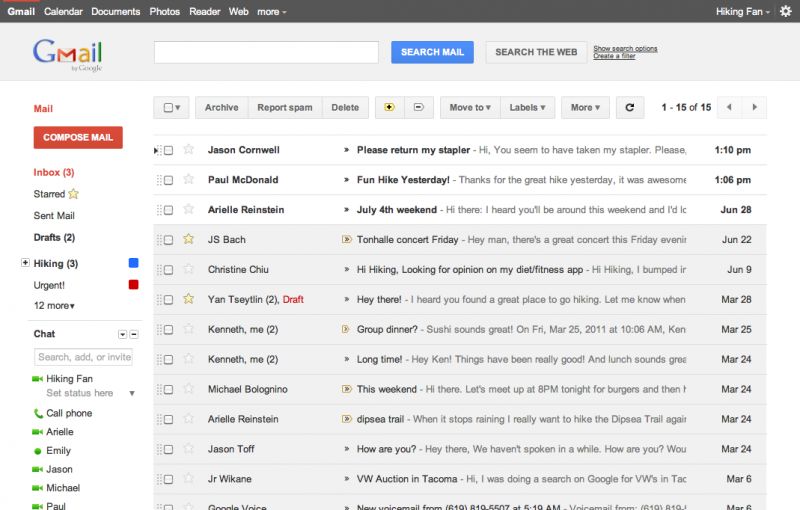
Gmail is an email service provided by Google. Users may access Gmail as secure webmail, as well via POP3 or IMAP protocols. Gmail's spam filtering features a community-driven system: when any user marks an email as spam, this provides information to help the system identify similar future messages for all Gmail users. Google also provides GMail alternative for business - Google Workspace.
Positions in ratings
#2 in Top 10 Email services
Alternatives
The best alternatives to GMail are: Outlook, iCloud Mail, Yahoo Mail, ProtonMail, Zoho Mail, Apple Mail

See also:
Top 10 Email services for Business
Top 10 Email services for Business
Latest news about GMail
2023. Gmail app gets highly requested native translation feature
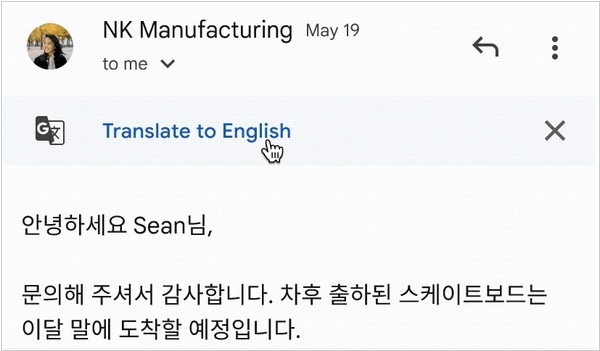
Gmail for Android and iOS are getting an inherent translation function, which can automatically identify the language of an email and provide a translation. This function, which has been a consistent feature on the desktop variant, currently supports 100 different languages. Previously, if users wished to translate an email, they needed to either manually copy and paste the text into Google Translate or capture a screenshot and upload it to Google Lens. To translate a message on mobile devices, users can simply select the "Translate" choice found in the three-dot menu at the upper-right corner of the email interface. Users are able to set their preferred output language in the settings, enabling a prompt to appear whenever an email's content doesn't align with the "Gmail display language."
2022. New Gmail redesign focuces on promoting Meet videoconferencing
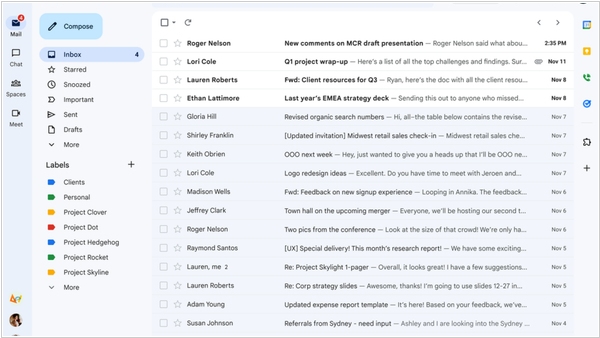
The Gmail update is being rolled out to all users. Google has kept the interface changes minimal, and you can customize the new design using the Quick Settings button located on the top right. The major enhancements include improved integration of Chat, Spaces, and Meet within Gmail, along with more visually appealing and colorful buttons. Beneath the surface, there are also modifications such as the introduction of "search chips" which refer to enhanced and precise search filters, as well as AI-powered search suggestions from Google. The company plans to introduce an enhanced experience for tablet users, improved emojis, and new accessibility features later this year.
2020. Gmail for G Suite gets deep integrations with Chat, Meet, Rooms and Docs
Google is rolling out a significant update to its G Suite productivity tools today, introducing a seamless integration of Gmail, Chat, Meet, and Rooms across web and mobile platforms. Additionally, popular tools like Calendar, Docs, Sheets, and Slides will also be deeply integrated. Google refers to this initiative as a "better home for work," offering enhanced product integration. Users can expect features like integrated calendaring and file management within Gmail, as well as the ability to simultaneously engage in real-time document collaboration while conducting a video chat in a split-screen view. Currently, these updates are specific to G Suite, but Google has plans to extend this integrated workspace experience to consumers, similar to its efforts with bringing Meet to a broader audience. The exact details of this consumer offering, however, are yet to be revealed.
2020. Google brings Meet to Gmail on mobile
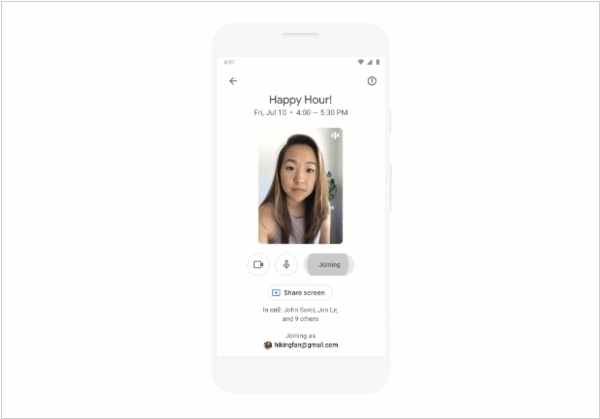
Google has recently integrated its Meet video conferencing service directly into the mobile version of Gmail. Users of Gmail on Android or iOS now have the convenience of joining Meet meetings directly from their inbox when someone sends them a Meet event link. This eliminates the need to install the dedicated Meet app solely for joining calls via Gmail. Within the Gmail app, a new Meet tab will appear at the bottom of the screen. This tab will display all upcoming Meet meetings from Google Calendar, allowing users to initiate a meeting, obtain a shareable link, or schedule a meeting within the Calendar. If you prefer not to have the Meet tab visible, you also have the option to disable it.
2019. You can now attach emails to other emails in Gmail
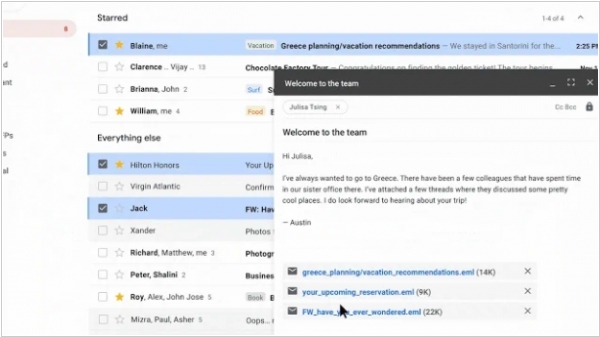
The latest feature in Gmail allows users to attach an email or an entire email thread to another email. This functionality proves to be more convenient in certain scenarios compared to forwarding multiple individual emails. To utilize this feature, users can initiate a new email and simply drag the subject line from the list of emails. The software will automatically recognize it as a potential attachment. The attached emails will be converted into ".eml" files, and there is no restriction on the number of emails that can be attached.
2019. Gmail now allows to schedule emails
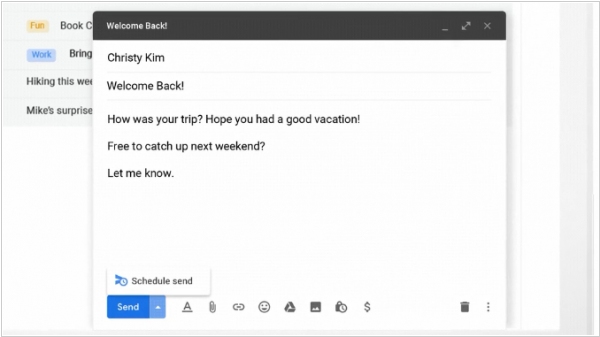
Google has introduced a new feature in Gmail that allows users to schedule their drafted emails to be sent at specific times in the future. While one might assume that Gmail already had this functionality, its addition is still likely to be well-received. Furthermore, Google has announced expansions to the popular Smart Compose feature in the email client. Smart Compose now has the capability to better emulate the user's writing style, particularly when it comes to informal greetings in emails. Additionally, Google states that Smart Compose can now suggest subject lines. Moreover, Smart Compose has been extended to support Spanish, French, Italian, and Portuguese, in addition to English, and is compatible with Gmail for Android.
2019. Gmail makes emails more dynamic with AMP for Email
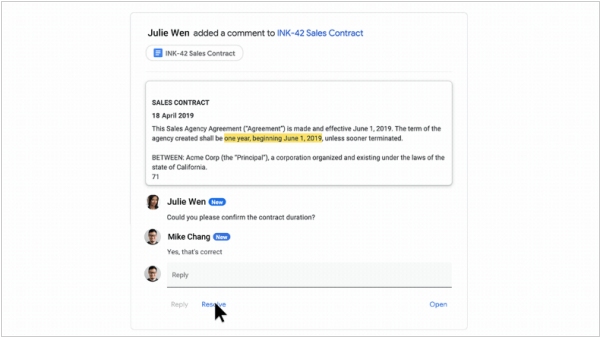
Google has introduced AMP for Email, a revolutionary initiative aimed at transforming static emails into dynamic, web page-like experiences. While initially available in Gmail, other prominent email providers such as Yahoo Mail, Outlook, and Mail.ru will also support AMP emails. AMP for Email holds the promise of elevating ordinary messages into interactive platforms that enable users to accomplish tasks directly within their web-based email client. With AMP for Email, users can engage with messages in a whole new way. For instance, you can RSVP to an event, complete a questionnaire, browse a store's inventory, or respond to a comment without leaving your email interface. This groundbreaking format has gained support from several notable companies including Booking.com, Despegar, Doodle, Ecwid, Freshworks, Nexxt, OYO Rooms, Pinterest, and redBus. The format incorporates various popular AMP markup features like carousels, forms, and lists. It's worth mentioning that these AMP messages also include standard HTML markup as a fallback for email clients that do not support AMP.
2019. Mobile Gmail gets Material Design UI
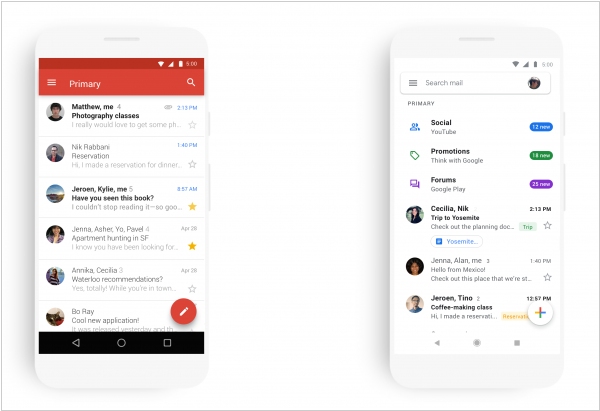
Gmail for mobile (available on iOS and Android) is receiving an updated appearance that aligns with the recent Material Design enhancements made to Gmail, Drive, Calendar, Docs, and Sites by the company. Users will notice a familiar UI reminiscent of the Gmail web app, including the option to select from three different density styles. Additionally, there will be new fonts and visual refinements. In terms of functionality, the mobile app is gaining several new features that bring it on par with the web version. Similar to the desktop experience, users can now choose between the default view, as well as comfortable and compact styles. Google has also improved the account-switching process, making it more convenient. Another noteworthy addition is the inclusion of the large red phishing and scam warning box, which was previously available only in the web version, now appearing in the mobile app as well.
2018. Gmail’s iOS app gets a unified inbox
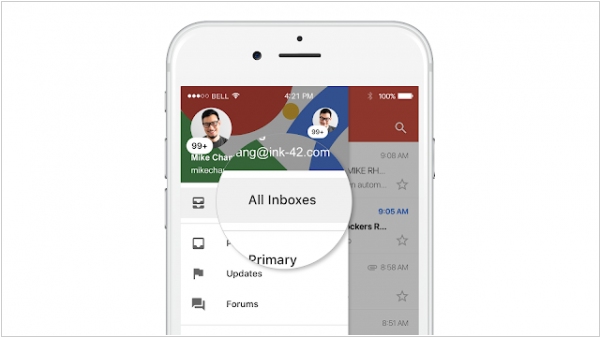
In today's digital landscape, individuals often manage multiple email accounts, dividing them between work and personal use. While Android users of Gmail have long enjoyed the convenience of viewing multiple inboxes in a single interface, iOS users have been limited to switching between accounts within the app's navigation. However, with the latest iOS update, Gmail introduces a new "All Inboxes" view accessible from the left-hand side drawer. This feature is compatible with both G Suite and non-G Suite accounts, including third-party IMAP accounts. Although a unified inbox may seem like a small addition, it addresses a significant pain point that has led many Gmail users on iOS to seek alternative third-party email applications.
2018. Google discontinues Inbox by GMail
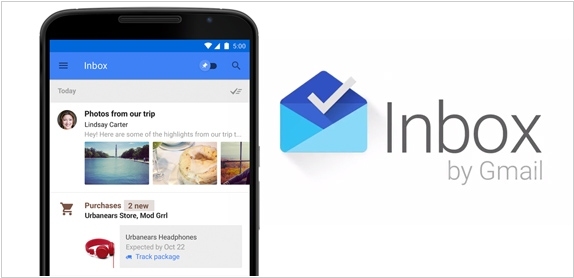
Google has officially announced the discontinuation of Inbox by Gmail, its experimental email client for Gmail, by the end of March 2019. The decision to close Inbox is aimed at redirecting Google's focus "exclusively on Gmail." Although this shift in strategy is understandable, it is disheartening to witness the departure of Inbox, which played a pioneering role in introducing many features that are now integral to the new Gmail experience. While the new Gmail incorporates most of Inbox's features, one notable omission is the absence of trip bundles. This highly valuable functionality automatically consolidates all flight, hotel, event, and car reservations into a unified bundle, representing one of Inbox's standout features. Google intends to introduce trip bundles to Gmail early next year, ideally prior to Inbox's shutdown.
2018. Google launches a lightweight Gmail Go app for Android
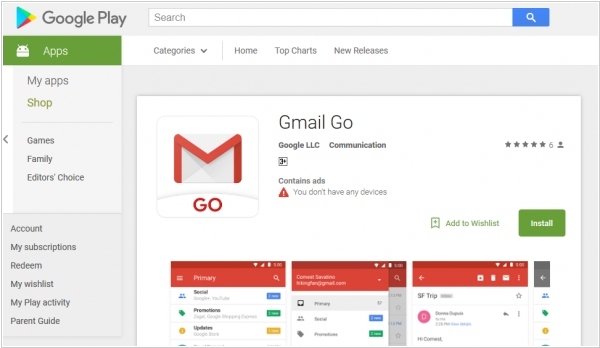
Gmail Go is the latest addition to the Android Go lineup, designed to provide users with a more efficient Gmail experience on their smartphones. This app occupies less storage space and optimizes mobile data usage compared to the regular version of Gmail. Despite its streamlined design, Gmail Go retains essential features, including support for multiple accounts, conversation view, attachments, and push notifications for new messages. Additionally, it incorporates Gmail's familiar functionality of prioritizing emails from friends and family, while organizing promotional and social emails into separate tabs.
2017. Gmail adds support for third-party add-ons
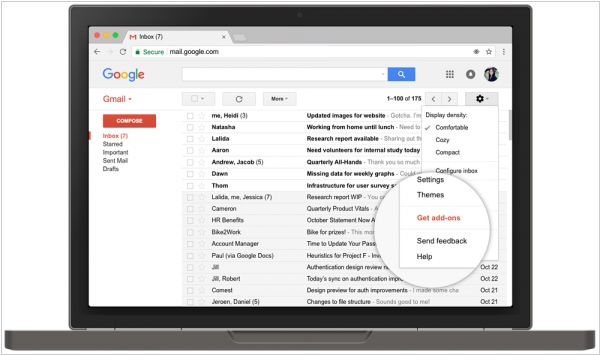
Today, Google has introduced the capability for third-party add-ons to enhance Gmail. These native extensions empower users, whether they are individuals or part of an enterprise, to leverage the functionalities of services like Asana, DocuSign, Trello, Wrike, and more directly within their inbox. The primary focus is on productivity services that already offer some level of integration with email. These add-ons reside in the right sidepane of Gmail, unfortunately not available in Inbox by Gmail, Google's alternative email client. Notably, these add-ons are also compatible with the mobile Gmail app on Android. Regarding iOS support, Google is collaborating with Apple to extend Gmail Add-ons to iOS users.
2017. Gmail starts converting addresses and contact info into links
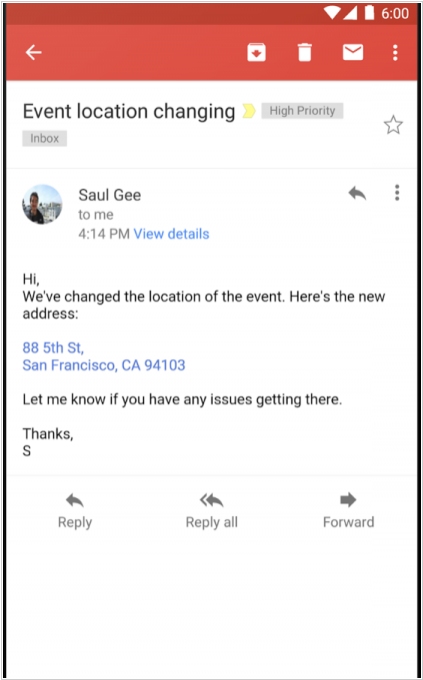
Gmail has introduced a new feature that automatically detects and converts addresses, phone numbers, and contacts into clickable links. This functionality is being rolled out today for Gmail and Inbox on Android, iOS, and the web. Most users will likely be familiar with this feature, as it is already present in almost every other major email client. When clicking on an address link, it will open Google Maps. Email addresses will launch a new compose window in your email client, and phone numbers will initiate a new call in Hangouts or your default phone app. The feature will become visible to all users within three days.
2017. Gmail gets Smart Reply feature
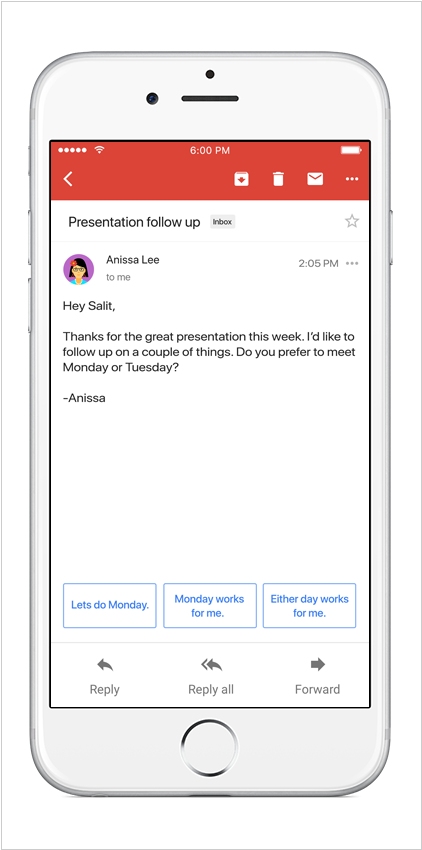
Google has recently enhanced the Gmail app by introducing an AI-powered feature called "Smart Reply." This innovative functionality leverages machine learning to examine your emails and propose concise and prompt responses that you might consider sending. With Smart Reply, you receive three suggested replies based on the content of the received email. After choosing one, you can either send it as-is or modify the response using the Smart Reply text as a starting point. By utilizing this feature, you can effectively save time. Smart Replies in Gmail are currently accessible in English through both the iOS and Android apps.
2017. Gmail adds add-on support

Google has announced the upcoming inclusion of third-party add-on support directly within Gmail. While there are already numerous services that enhance Gmail's functionality, they typically rely on browser extensions. With the new update, users will have the ability to install these add-ons from the G Suite Marketplace, which already hosts various add-ons for Google's productivity tools like Docs and Sheets. Once installed, these add-ons can be utilized both on the web and within Google's mobile Gmail apps. Although the feature is slated for release "later this year," specific timing details have not yet been provided by Google.
2017. Exchange Tasks became available in Gmail app
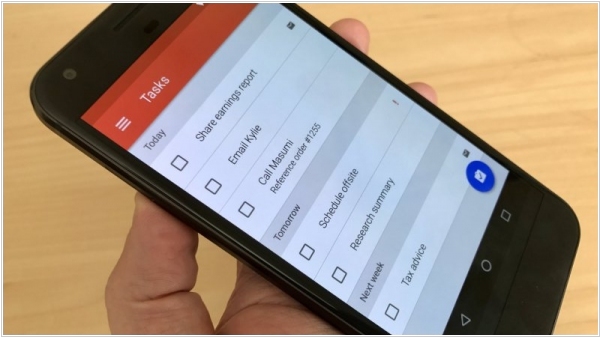
Last year, Google introduced support for Exchange accounts in the Gmail app for Android, enabling users to utilize a single familiar mail app for both personal and work-related matters. Additionally, users can now synchronize their tasks with Exchange, ensuring that they can effectively manage their task list even while on the move. Users have the ability to create tasks, modify their dates or priorities, and designate emails as to-dos for future responses. The unified tasks list facilitates a focused approach towards important tasks, allowing users to effortlessly mark them as complete once finished. Notably, the Gmail app for Android is equipped for enterprise usage, enabling secure deployment by IT departments. Moreover, the app seamlessly integrates with managed configurations, eliminating the need for complex setup procedures.
2016. Gmail for iOS Gets Undo Send button
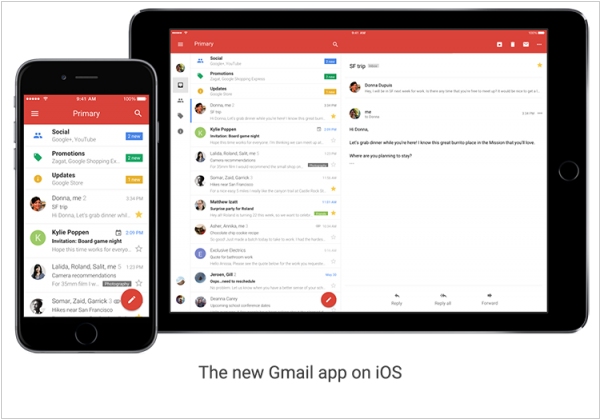
After a gap of four years, Google has finally released an update for its Gmail iOS app. The latest version closely resembles its Android counterpart, which has been available on Android devices for the past two years. The revamped design was driven by customer demand for "highly requested features," including easier message deletion, streamlined archiving, and improved email management. Notably, the update introduces the popular "Undo Send" feature, already present in Google's desktop Inbox service, allowing users a brief window of opportunity to retract a sent email. Additionally, Google has enhanced search capabilities and spelling suggestions for search terms within the app.
2015. Google Contacts gets a new look, integrates with Google+
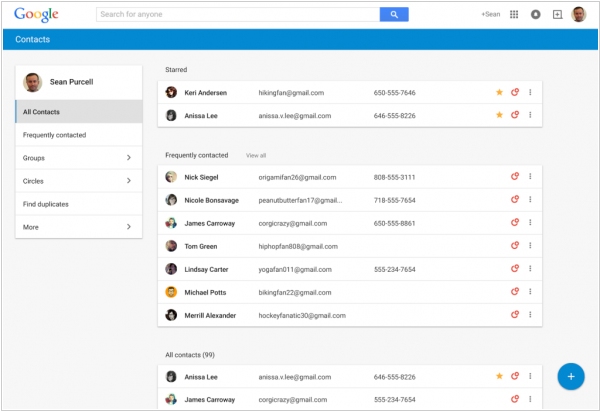
Google is providing a preview of an updated version of Google Contacts, accessible through this link: Google Contacts. This new version aims to merge users' connections from Gmail and Google+ into a single location. With the updated Google Contacts, information from contacts' Google+ profiles, such as job titles, addresses, and phone numbers, will be automatically fetched. Furthermore, contextual details like recent meetings or exchanged emails with a specific person will be included. The refreshed Google Contacts introduces a new appearance and user experience. It also offers a redesigned tool for resolving duplicate contact information, allowing users to quickly merge multiple entries. While Gmail's contacts currently provides a similar functionality, the new tool promises to be more intuitive and user-friendly. Google plans to gradually roll out these updated contacts to Gmail users over the next few weeks. However, it's important to note that like the Inbox app, this feature won't be immediately available to professional Google Apps users.
2014. New GMail for Android supports third-party email providers
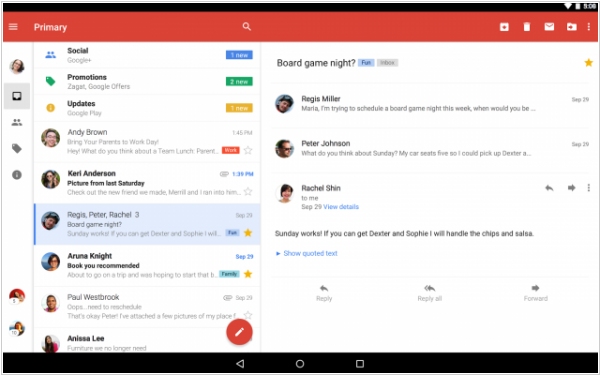
Google has recently launched the Gmail 5.0 app for Android, featuring a fresh and contemporary design, as well as expanded support for various non-Gmail email accounts. In the past, the Gmail app was restricted to Gmail or Google Apps accounts exclusively. However, with the latest update, users can now configure separate inboxes for different email providers such as Yahoo Mail or Outlook.com using POP/IMAP settings. Additionally, Gmail 5.0 for Android introduces a redesigned user interface that embraces Google's Material Design language, aligning with the aesthetic changes anticipated in the forthcoming Android Lollipop update. The update also brings several navigational enhancements, including a new reply button located at the bottom of messages and design refinements that simplify the process of switching between different accounts and inbox categories, particularly on tablet versions of the app.
2014. Google unveiled its Email 2.0 service
Google has introduced a new email application called Inbox, designed to assist users in efficiently managing their messages by highlighting crucial information and offering increased control over their to-do lists. Currently, access to Inbox is limited to invite-only users. The primary concept behind this app is achieving an "inbox zero" state, where the inbox is free from the clutter typically accumulated in Gmail on a daily basis. Inbox incorporates helpful features such as Bundles, which organizes similar types of messages together, Highlights, which prioritizes important emails, and Reminders that serve as alerts for various tasks. Google envisions Inbox eventually replacing Gmail, although this transition is not expected to occur in the immediate future.
2014. Google+ users now can send messages to your GMail inbox
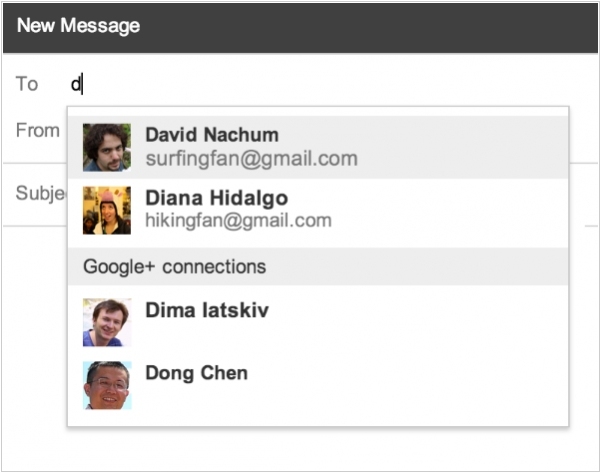
Google is actively exploring ways to promote its social network, Google+. In its latest endeavor, it leverages GMail as a means of expanding its reach. If you are a GMail user, it's important to note that anyone on Google+ can now send you email messages, even if they don't know your email address. However, if you wish to avoid receiving these new commercial or spam offers, you have the option to disable this feature by accessing the Settings in GMail. Alternatively, you can choose to allow only your "Google+ circles friends" to email you. On the flip side, if you are involved in marketing, this presents a valuable opportunity to reach out to individuals whom you previously couldn't contact. Simply locate these individuals on Google+ before they disable this feature in their GMail settings.
2013. GMail, Outlook.com, Yahoo Mail and Zoho Mail: small business email news

Over the past few days the number of interesting news came from the most popular email services for small business - GMail, Outlook.com, Yahoo Mail and Zoho Mail. First of all, last week Yahoo Mail together with website-hosting Yahoo Small Business was down for several days, and of course left a lot of small business customers mad as hornets. Now many of them are going to move to another service. And Microsoft (shortly before this event) decided to entice users from GMail and Yahoo. But, unfortunately , they began with GMail and now can't fully seize the moment. However, their new tool for importing emails and contacts from GMail to Outlook.com is already working. ***
2013. GMail allows to preview attachments
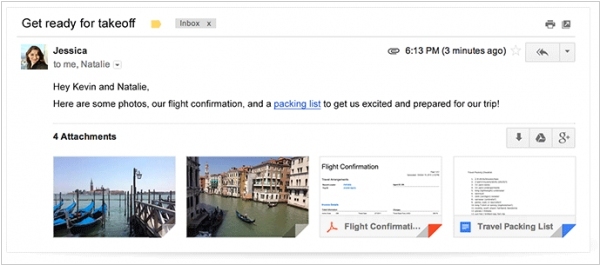
In the past, IT vendors focused on promoting electronic documents over paper to support environmental ecology. Now that most documents have gone digital, it's time to address the ecological impact of computer networks. The tremendous amount of data traffic and the presence of multiple copies of the same documents in various locations have become environmental concerns. IT companies are now advocating for a new approach: "Documents should be created, stored, viewed, edited, and approved in the Cloud." According to the developers at Google, downloading a document from the Internet to your computer is akin to chopping wood and harming wildlife. In line with this perspective, a new feature has been introduced in Gmail today. Users can now directly save attachments (files and documents) from received messages to their online storage in Google Drive. Moreover, Gmail already offers the ability to attach files from Google Drive directly to outgoing messages, eliminating the need to download and re-upload documents between email and storage.
2013. Google discontinues YouTube, adds revolutionary features to GMail and Google Apps
Google continues to close good services and invent stupid things. Youtube was very useful service for business. It was the primary channel for video marketing and hosted a lot of training videos. But it turned out that Youtube - was just a contest to define the best video in the history, and now when the contest is over - Youtube will be closed. In order to compensate this loss Google introduced two big updates for GMail and Google Apps. The first of them - Gmail Blue - it's the new revolutionary inbox interface that is completely blue. Blue buttons, blue icons, blue text. They say it's the interface of the 21st century (see video above). And the Google Apps adds "Levity" mode, which makes calendars, messages and documents more interesting and relaxing and increases the efficiency of team work. Video: ***
2012. GMail integrates with Google Drive, Outlook.com comes to Android
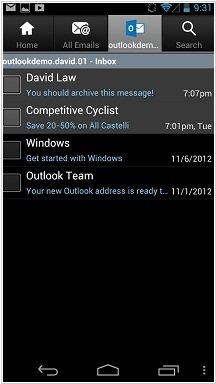
Competition - is good for customers. When competition is strong, vendors stop being lazy and even forget about their political principles. And we've got the very interesting competition here: GMail vs Outlook.com. Microsoft recently turned its "mail for blondes" Hotmail into a solid and practical Outlook.com and now (as Microsoft says) it entices GMail users every day. Outlook.com advantages over GMail (according to Microsoft) are better spam protection and cleaner design. And different GMail features (discussion threads, hotkeys, themes ...) are gradually coming to Outlook.com. Today Outlook.com added an Android-application. Of course Android - is the competing platform, and so what? ***
2011. Google+ integrates into GMail
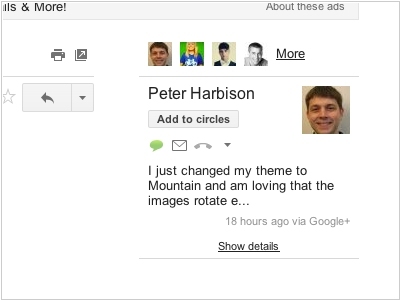
Usually the companies that develop and sell intranet portals, position them as an alternative to the Email. They say that instead of endless mailing back and forth, your users can now work with data in one place. But with Google - it's another story. Google wants companies to use Google+ as a social intranet solution and continue using GMail. So that's why both solutions have been closely integrated. In GMail you now can filter messages by Google+ circles. So, if you create a Google+ circle for a workgroup, you can view all emails related to this workgroup separately. In the right column near the message you now can see the latest post of this contact in Google+. In addition, contacts in GMail will be updated, if your co-worker updates his profile in Google+. Thus, your address book will be always relevant. ***
2011. Adobe kills mobile Flash. Google kills GMail for Blackberry
The confusing situation with mobile platforms is getting more and more clear day by day. The weaker devices, platforms, intermediate platforms are heading to the deadpool. Today, Adobe announced that it stops the development of Flash for mobile devices. As you know, the mobile Flash was actually killed by Steve Jobs, when he banned it on iOS. After that, Microsoft also didn't support Flash on Windows Phone. And although it later appeared on some Android-devices and Blackberry Playbook, it wasn't clever for Adobe to continue developing this not-so-crossplatform technology. Instead of Flash the company will focus on HTML5-app building tools. As we have suggested, HTML5 can become the "new flash" for Adobe. ***
2011. Google restores offline access to GMail, Calendar and Docs in Google Chrome
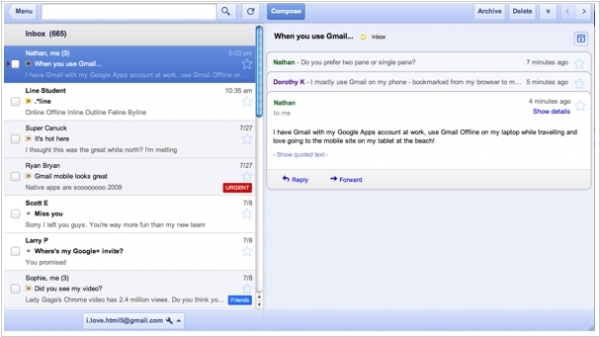
As you know, earlier GMail, Google Calendar and Google Docs supported offline mode in all browsers using Google Gears plug-in. But then Google decided to bet on HTML5 and abandoned its own proprietary plug-in. The Gears was quickly removed from the Chrome browser (in Firefox and IE it still works). And today Google developers were happy to announce that the offline mode for these apps in Chrome is back and it is implemented on HTML5. However, for an average user it will look no better than it was before: for offline access you still need to install an app (from the Chrome Web Store). In addition, the interface of the offline app is different from the usual web-based GMail interface. It looks lie GMail for iPad. ***
2011. GMail gets Outlook-like views
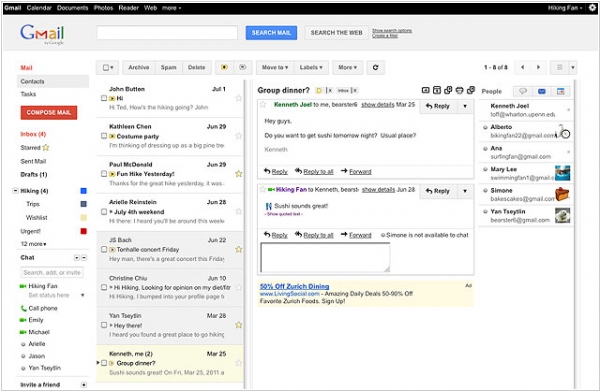
What can Google do to attract users from Outlook to GMail? One approach is to make GMail resemble Outlook, and now that's possible. You can now add a Preview pane to your GMail inbox, positioning it in the third vertical column (as shown in the screenshot) or below the messages list. This feature can be enabled in GMail Labs. However, with the left navigation sidebar, message list, the message itself, and the right sidebar (including the new People Widget and ads), there's a lot happening in the inbox.
2011. GMail VoIP is available almost globally
The VoIP service in GMail, previously available only in the U.S. and Canada, is now accessible to users in nearly all countries worldwide, supporting 38 different languages. However, there are a few countries where Gmail Call Phone is currently not available, including Argentina, China, Cuba, Egypt, Ghana, India, Iran, Jordan, Kenya, Mexico, Morocco, Myanmar, Nigeria, North Korea, Peru, Russian Federation, Saudi Arabia, Senegal, South Korea, Sudan, Syria, Thailand, United Arab Emirates, and Vietnam. With this global expansion, Google has also reduced its VoIP rates, making them slightly more affordable compared to its main competitor, Skype. For instance, a call to France costs 8 cents (compared to 16.9 cents in Skype), and a call to the USA costs 1 cent (compared to 1.9 cents in Skype). Similar to before, using GMail Call Phone requires a quick installation of a browser plug-in, which is the same plug-in used for video calling in GMail.
2011. Video-battle: GMail vs Microsoft Office 365

Remember how Mark Benioff laughed at Microsoft's anti-advertising campaign? It turns out that Microsoft also can do similar things. A few days ago Google launched the advertising campaign that encourages users to switch from draconian email systems and their “embarrassingly outdated addresses” over to GMail, which features such niceties as free phone calls and video chat. For this campaign the video (see above) was created. You can see the red link to this video in your GMail-account. But Microsoft, whose Hotmail service is obviously one of the targets of Google's campaign, isn’t keeping quiet. Today another video hit the Web: ***
2011. Google Apps Mail gets read receipts
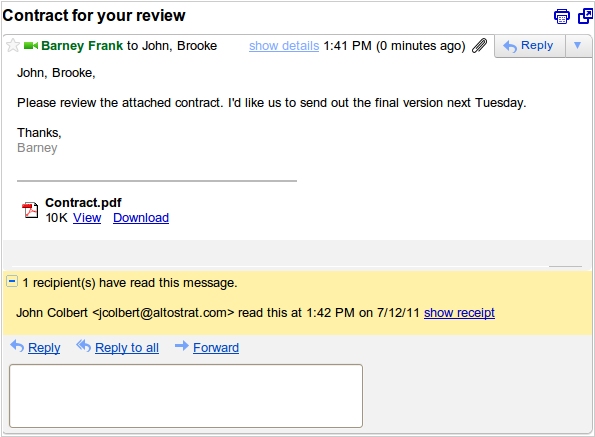
Google Apps for Business has introduced an intriguing new feature - read notifications. This functionality operates as follows: when you send a message and do not receive a response for an extended period, you have the option to open the message and verify whether the recipient has read it or not. This notification can be enabled by the Google Apps account administrator for all users and exclusively applies to internal communications within the domain. As a result, you can enhance the level of accountability and potentially improve the efficiency of internal collaboration. With this feature, an employee sending an important task via email can ensure its reception and, if necessary, contact the recipient to prompt them to check the email.
2011. GMail gets instant search
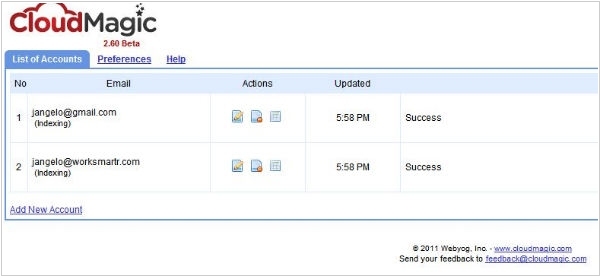
Quite a strange idea - to make a search plug-in for GMail and Google Apps - i.e. the services of the Search Giant. Nevertheless, the startup CloudMagic had enough courage to make it. And they've created really useful thing. Most people would say that the search in GMail - is great enough, and even if this CloudMagic gives search-as-you-type results - it's not the reason to pay attention to it. But the search speed - is not the greatest feature of CloudMagic. First, it shows search results in a popup widget - on top of the main GMail interface. So if you writing an email and need to find some information in the previous messages or docs - you don't need to save the email to drafts, open the search page, then view the search results one by one, copy something and go back to the email. Now you can (without closing the message) quickly find and copy what you need in the popup widget. ***
2011. The new super-feature in GMail - People widget
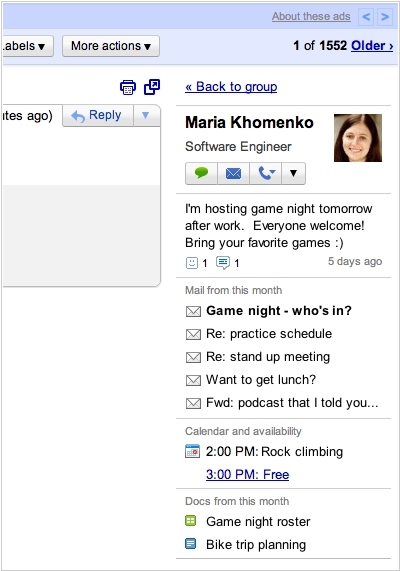
During the upcoming two weeks, Google plans to introduce a new feature called People widget in GMail. This widget, located in the sidebar, will provide information about the person who sent you an email. It will display their profile picture, a brief description, their current schedule from Google Calendar, their latest emails, shared documents, and recent messages from Google Buzz. Additionally, the widget offers convenient options to contact your contacts via email, chat, schedule a meeting, and more. If multiple people are involved in the conversation, you'll see a list of participants along with their online status. Unlike popular social plugins such as Xobni and Rapportive, which gather public information from social networks like Facebook, Twitter, and LinkedIn, the People widget solely utilizes internal data from Google services. Therefore, its primary purpose is to enhance collaboration and social interaction within companies that utilize Google Apps.
2011. Kinect + GMail Motion : use gestures to manage your inbox
On April 1st, Google playfully introduced a new feature called GMail Motion. It claimed to enable users to control emails and input text in the GMail mailbox through gestures (as demonstrated in a video). However, not everyone grasped the humor behind it. A group of individuals from Southern California University took this concept seriously and transformed it into a reality by connecting a Kinect device to GMail using a plugin. Here's an explanation of how the technology functions:
2011. How to backup your GMail account
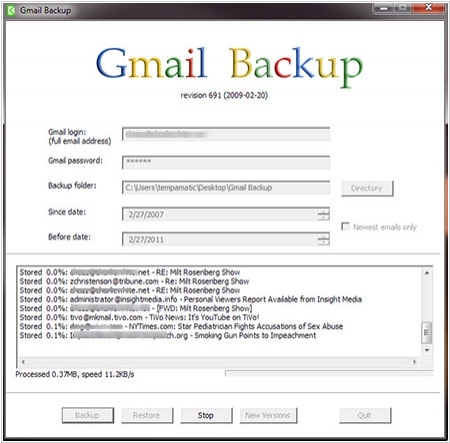
This morning about 150 thousand GMail users were very surprised to see that all their email history disappeared. And while Google is working to restore the data, it's time to think about safety for those who was not affected. Of course, users of the paid Google Apps may not worry, but if you use a free GMail account, it is recommended to create mailbox backups. And do not panic and insist that SaaS applications - are not safe. If you keep all your mail only in the desktop e-mail client, the probability that your computer glitch and lose your data - is usually not less than the probability of data loss by SaaS-provider. So, there are 3 ways to save your GMail on your computer: ***
2011. SMS authentication in Google Apps is available for all
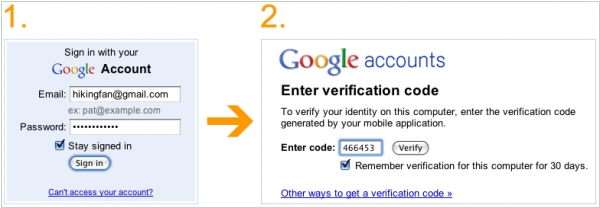
The feature of two-factor authentication, initially introduced for users with paid Google Apps accounts in September 2010, is now accessible for all free GMail and Google Apps accounts. It's worth noting that unlike standard authorization processes, two-factor authentication involves an additional step. This entails entering a secret code received via SMS or generated by a mobile application (available for Android, iPhone, or BlackBerry). This method of authentication is commonly employed by online payment systems and Internet banking services due to its ability to provide a heightened level of security. If you primarily use a single computer, you will not need to enter the code frequently as the authorization will occur automatically. As a result, you will experience minimal inconvenience while significantly enhancing the security of your data. To enable two-factor authentication, please visit this page.
2010. Facebook Messages - one simple idea that can change Email
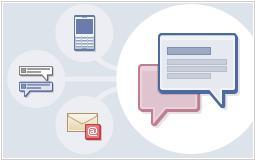
Facebook today has introduced the updated messaging system Facebook Messages, which is also known as "Email killer" or "GMail killer". Given that all Social Web inventions are now rapidly deployed to Enterprise, we are certainly want to find out if it will kill such useful business tools as Email and GMail. At first sight - it's nothing to worry about. Although Facebook Messages can really replace Email in communications between family and friends, but in the Enterprise sphere it will be able to replace Email only in some cases for communication with customers. No one will use Facebook for important business correspondence because of its privacy issues. However, one simple idea of Facebook Messages can change the Email position in the Enterprise too. ***
2010. EmailOracle - email tracker for GMail
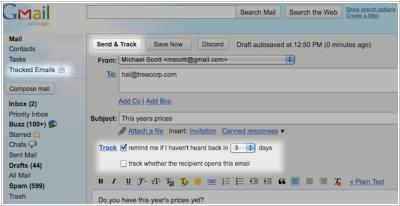
Sometimes you send important email-messages. And in this case, it is important for you to know whether the recipient has read the message, and if he hasn't responded - contact him again. You can strain your brain and keep all the important things in your memory. You can use reminders such as Google Calendar, but it's not very convenient. The new plug-in for GMail - EmailOracle - is an ideal solution for such cases. It adds 2 checkboxes to send-email form - "remind me if I haven't heard back in ... days" and "track whether the recipient opens this email". It's not hard to guess what happens after you send the email. Alerts / reminders are sent by email, or you can open the EmailOracle control panel and immediately see the status of all tracked emails. To track the message opening EmailOracle inserts in it a small picture, which works like a common site counter. And with this picture there is a little trick: ***
2010. Google rolls back innovations in search of revenue
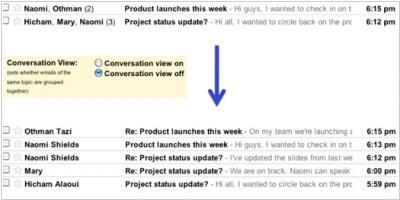
Google has created a lot of innovative products, including GMail and Google Apps. Almost all progressive people enjoy and use them. But unfortunately, most office workers who use the paid versions of these applications - can hardly be called progressive. They are doing their job and want that mail and other business applications work in a traditional way and not to change. That is why, we see strange (but logical) things: Google rolls back innovations in order to please this paying majority. For example, GMail. Last year Google resolved the global problem with tags (because this paying majority got used to folders in Outlook). GMail tags began working like folders - with tree view, drag and drop feature. Today GMail adds an option to switch off the threaded view - that is, to remove the most convenient GMail feature. The similar process is taking place in the Google Docs: ***
2010. Google improves video chat quality
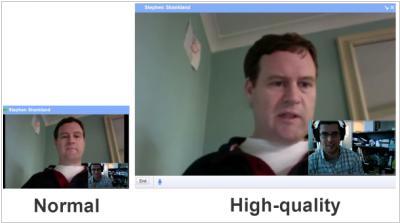
Despite Gmail video chat not reaching the same level of popularity as Skype and not generating revenue for Google, the company remains committed to its development. Notably, Christopher Vander Mey, Senior Product Manager for Google Apps, personally leads this effort. It suggests that Google has significant plans for incorporating video chat into the business environment. Further supporting this notion is the introduction of an enhanced video quality feature, now available in Gmail Labs. By enabling this feature, users can experience improved picture clarity, reduced CPU load, and even utilize a lower internet connection. Vander Mey attributes these advancements to Google's own development, specifically mentioning the use of hardware-accelerated video decoding technology based on H.264. It's important to note that this improvement is not a result of the GISP acquisition. To enable video chat in Gmail, users are required to install this plug-in.
2010. GMail will save your Attention
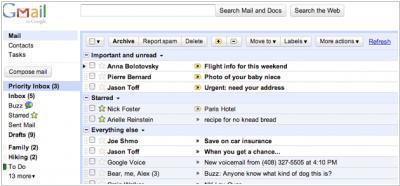
Attention - is more precious resource than time. And e-mail - is a black hole, which draws your attention. While spending just a few minutes to check your inbox, you can spend a lot of (units) of attention - tire your brain and significantly reduce its efficiency (especially if you use to check your email every half an hour). Until now, GMail users had some advantage in this issue. GMail provides, perhaps the world's best spam filter. Besides, tags, stars, customizable filters, discussion threads help to make the mailbox more clear. But nowadays, when an average office worker receives 110 emails per day - it's not enough. That is why the GMail developers came up with the new revolutionary GMail feature - Priority Inbox . ***
2010. GMail = Unified Communications client
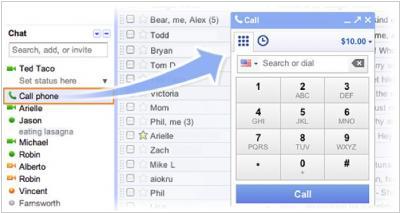
Few days ago the analytical company Frost & Sullivan stated that Google will soon storm the unified communications market, which is dominated by Cisco, Avaya and Microsoft. After all, Google has GMail, Google Voice, GTalk, Buzz, Gizmo5, Android, GISP and it remains just to combine all these technologies into single offering. And Google has decided to immediately confirm this forecast - from today GMail allows you to make and receive phone calls (thanks to the integration with Google Voice and Gizmo5). Meanwhile the VoIP service in GMail is available only in US. ***
2010. Google Contacts will become a CRM solution
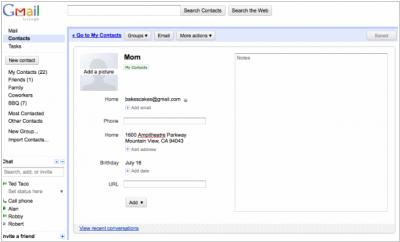
Today, Google has rolled out the new GMail version and it's major upgrade is the fully redesigned Google Contacts section. Now the main GMail menu consists of 3 main items: Mail, Contacts and Tasks. And while the Tasks module is still like a toy, the Google Contacts has been remaked into a grown-up contact manager with interface, similar to Gmail (which has already proved its usability). You can now assign tags to contacts, like to emails. The contact page now includes the large Notes field that is convenient to log the most important points in relationships with a person. You can also see all email conversations with this person. Besides now you can edit the contact data without switching to the edit mode (like before). But the most interesting - is not the external redesign. It turned out that Google Contacts has its own product manager - Benjamin Grol, and when he represented the new features, he noted that Google is thinking about turning Contacts into a better CRM solution. ***
2010. GMail signatures for Internet Entrepreneurs
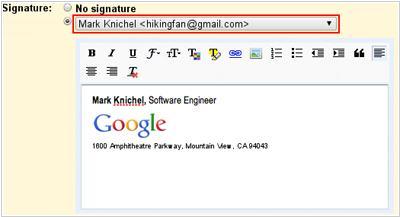
Around a year ago, GMail transformed into a comprehensive email service for virtual businesses by enabling users to send messages through any SMTP server. This means that users can now send emails from their GMail accounts using any email address (for example, responding to customer emails from their personal GMail inbox while appearing to send from the corporate domain). However, there was one small issue that hindered the usability of this feature - users could only create a single signature for all email accounts. Fortunately, after a year, this problem has been resolved. Now, it is possible to create separate signatures for each email account within GMail. Additionally, users can format the signature using a WYSIWYG editor and include links and images. This enhancement is undoubtedly a welcome addition for internet entrepreneurs.
2010. Socialwok uses Gmail and Outlook as its clients
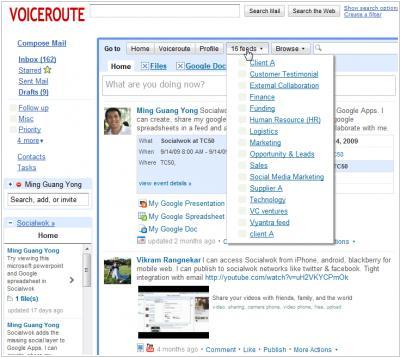
Socialwok (known as the "social layer for Google Apps") like the online organizer Producteev, shows us the new meaning of "cross-platform" definition. Realizing that users most of time spend in email clients (such as Outlook and GMail), Socialwok simply decided to get inside these email clients. Socialwok was one of the first services to use the new GMail API and has created the gadget that can be expanded on the entire GMail workspace (see screenshot) and allows to post messages to microblogs, share Google Docs files, images, Youtube videos and events from Google Calendar, search for Google Docs, post to Twitter or Facebook right from your GMail interface. ***
2010. GMail and Google Buzz as developer platforms
In addition to the business version of GAE and cloud storage GS, at the I/O conference Google introduced for developers the new APIs for GMail and Google Buzz. New GMail API allows developers to embed applications directly to emails (as gadgets). These gadgets are currently only available for GMail in Google Apps, and may be added by account administrator from Google Apps Marketplace. For example, Gist and Xobni gadgets display person social information at the bottom of email (as they do it in MS Outlook and Lotus Notes). The Manymoon gadget allows to quickly create a task or project from the email. Taking into account that virtually all enterprise collaborative and social tools use email for notifications, we can expect an avalanche of new GMail gadgets, as well as increasing popularity of this email service in the enterprise segment. ***
2009. GMail adds new enterprise-specific features
Today, GMail has taken another significant step towards capturing the enterprise market by introducing email retention and delegation features for Google Apps customers. These new functionalities empower organizations to establish company-wide email retention policies to ensure compliance with regulatory requirements. Additionally, users now have the ability to delegate email management to others within their organization. Implementing an email retention policy is crucial for maintaining regulatory compliance in enterprise settings. Different sectors may have specific industry and government regulations dictating the retention, storage, and duration of email data. Starting today, administrators using the Premier Edition of Google Apps can configure and enforce these policies. While email delegation primarily caters to executives and administrators rather than being universally applicable, incorporating such business-specific functionality into Google Apps is undeniably significant.
2009. Gmail now supports third-party SMTP servers
Today, Google has unveiled a new Gmail feature that enables the utilization of outgoing SMTP servers for sending emails. Previously, Gmail had the capability to send emails from third-party email accounts, accompanied by a message indicating that it was being sent "On Behalf Of" that particular account. Although this went unnoticed by most users (as many mail clients do not display the "On Behalf Of" message by default), it posed a significant concern for some individuals. With this new feature, you can now send messages that appear to originate from your work account instead of your Gmail account.
2009. Google Wave to replace GMail
Google has unveiled an impressive new online communication and collaboration tool called Google Wave, which represents the next stage in the evolution of email. The goal of Google Wave is to bring together various forms of communication on the web, combining elements of email, web chat, instant messaging, and wikis. One of its standout features is the ability to replay conversations in real-time, as it captures the entire sequence of communication character-by-character. This dynamic nature is further enhanced by the ability to see others typing live. Google Wave goes beyond traditional email with features like drag-and-drop attachments, instant file sharing within conversations, and the ability to embed conversations on blogs. Its interface resembles a Gmail inbox, but with a stronger focus on contacts, featuring their faces in the sidebar. The unique aspect of conversations within Google Wave is that users can reply and add their thoughts anywhere within a message, fostering a truly shared and collaborative communication experience.
2009. Google launched a new Gmail mobile web app
Google has introduced a new Gmail mobile web application designed specifically for iPhone and Android devices. This revamped app has undergone a transformation to mirror the appearance and user experience of the desktop version of Gmail. It offers enhanced offline functionality, allowing users to access their Gmail messages even when their network connection is unreliable. The updated app is faster in performing various actions such as opening emails, navigating through the interface, and conducting searches. Additionally, a convenient "floaty bar" appears at the top of the screen when a message is selected, providing easy access to options like archiving, deleting, and other actions. This floating bar remains visible as users scroll through their inbox. The new mobile app also improves the readability of messages and presents labels in a manner that closely resembles the Gmail labels seen on the desktop site.
2009. Gmail Goes Offline With Google Gears
Today marks a significant change for Gmail as one of its major limitations has been addressed. Users can now access their emails offline, thanks to the introduction of a Google Gears version of Gmail available in Gmail Labs. By installing the Google Gears plug-in, Gmail can detect when users are offline and cache their emails for reading, responding, searching, starring, and labeling. When an internet connection is reestablished, the messages are sent. This offline functionality is similar to how Gmail operates on mobile devices such as Android, utilizing the same sync engine. While certain features like spellcheck won't work offline, users can still open attachments, though attaching files will be added in the near future. Google Gears plays a pivotal role in the company's web application strategy, with Google Docs having an offline version since March 2008, and an offline Google Calendar soon to be available for enterprise customers. The long-term vision is to leverage the browser as the ideal platform for deploying diverse applications, emancipating Gmail users from the constraints imposed by connectivity.
2008. Google gives Gmail users a to-do list
Google has introduced a new feature called Tasks in Gmail, aiming to enhance user productivity. When enabled, the Tasks feature appears as a box at the top of the Gmail window, allowing users to easily add, reorder, and delete tasks. Users can assign due dates to tasks and even convert emails into tasks. The feature extends beyond the email program, offering a convenient way to manage tasks. Adding items is as simple as clicking on an empty area of the box and typing. While this may seem similar to older note-taking programs, the integration with Gmail ensures that the task list is constantly visible, serving as a reminder for things that need to be accomplished. Since email is a central part of many people's personal and professional lives, it makes sense to include a task list that covers non-email related activities, such as setting a reminder for dinner reservations. To enable Tasks, users can go to Settings in the upper right corner of the Gmail window, click on the Labs tab, enable Tasks, and save the changes. After refreshing Gmail, a Tasks link will appear under the Contacts link, providing users with an easy way to boost their productivity.
2008. Google Adds Voice And Video Chat to Gmail
Google is launching voice and video chat for Gmail, directly competing with Skype, Meebo, and TokBox. Users can now engage in instant message conversations with the option to switch to video or voice chat by clicking on the "Video & more" menu in a Gmail chat window. The feature allows for full-screen viewing, adjustable window size, and positioning. With Gmail as a primary email platform, users no longer need to open a separate application for spontaneous text, voice, or video chats. This move aligns with Google's goal of seamlessly connecting its services while providing a better user experience. The addition of video chat within Gmail poses a challenge for startups specializing in video chat solutions. The feature originated from Google's acquisition of Marratech, an e-meeting startup, in 2007.
2008. Gmail’s New Gadget Support Lets You Remember The Milk
In a recent announcement, Google unveiled a new set of gadgets for Gmail Labs that provide integration with Docs and Google Calendar. However, the most noteworthy aspect (which received less emphasis) was the introduction of support for third-party gadgets, enabling users to enhance Gmail with additional features beyond Google's offerings. Remember The Milk (RTM), a popular To-Do list application, was one of the first developers to take advantage of this new capability. Previously, RTM relied on a Firefox extension for Gmail integration, limiting its accessibility. The new Gmail gadget, on the other hand, works across all major browsers without the need for plugins. Although adding the gadget requires some manual configuration, it provides a glimpse into the future of expanded developer access and integration possibilities within Gmail. Google is expected to further enhance the user experience and enable more Gmail add-ons to transition from plugins to native gadgets in the coming months.
2008. Google brings text-messaging to online chat
Starting Thursday, Google will expand the instant messaging feature in Gmail, allowing users to send text messages to their contacts' phones. According to Gmail Product Manager Keith Coleman, users can access this feature by clicking on the chat window's settings or typing a contact's phone number in the chat contact search box. Initially an experimental feature available through Gmail Labs settings, Google will make it accessible on Thursday. Gmail Labs serves as a testing ground for new features, with several popular options such as attachment reminders, customizable flags, chat pictures, and QuickLinks. However, Google plans to refine and test these features further before incorporating them into the standard Gmail application. It's important to note that the Gmail text-messaging feature is exclusive to Gmail and does not work with other Google messaging options. Behind the scenes, text messages are sent from a specific Google phone number, reserved for this purpose, and each pair of users retains that number for future communication. The recycling of phone numbers is feasible since most users are unlikely to exceed 1,000 text-message chat contacts.
2008. Google Adds Gadgets To Gmail
Gmail is expanding its sidebar options by allowing users to add gadgets that display their Google Calendar appointments and recent Google Docs documents. The calendar gadget enables users to view subscribed calendars and add events directly from Gmail. The Docs gadget offers various view options, such as spreadsheets, presentations, or documents opened by the user. Additionally, Gmail Labs is introducing an experimental feature that lets users turn any Google gadget into a sidebar item by pasting its URL. This gives users the flexibility to incorporate their preferred gadgets into Gmail's sidebar, providing convenient access to Google's other apps. This integration across apps showcases Google's ongoing efforts to create seamless connections and enhance user experience.
2008. Users can automatically encrypt Gmail connection
Gmail has introduced a new option that allows users to encrypt their communications between their browser and Google's servers by default. This feature enhances the security of the email service, but it may also result in slower performance. Previously, users could manually enable encryption by accessing Gmail through the URL "https://mail.google.com." However, with the recent update, users can now choose to have the encrypted connection automatically activated. Gmail engineer Ariel Rideout explained in a blog post that enabling encryption requires additional processing by the user's computer, and encrypted data doesn't travel as efficiently as unencrypted data. Therefore, Google gives users the freedom to decide whether they want to prioritize security or efficiency. The encryption is achieved through HTTPS, a secure version of the HTTP protocol used for fetching information from servers. While HTTPS ensures that network traffic is difficult to intercept, it only encrypts communications between the browser and Gmail's servers and does not provide end-to-end encryption like PGP or GPG software. However, it's important to note that the Gmail login process is always encrypted.
2008. Google Gears Coming to Gmail and Google Calendar Soon
Within the next six weeks, Google plans to introduce offline support for Gmail and Google Calendar through Google Gears, as stated by Andrew Fogg from kusiri. This move follows Google's previous implementation of offline access for Google Docs and Google Reader. Additionally, Google is expected to support SyncML for contact synchronization in Gmail around the same time. As Google aims to expand its presence in small businesses and enterprises, providing offline access to email and calendar functions has become essential. Despite the increasing availability of mobile Internet access, business users prefer not to rely solely on online connectivity for accessing their email and calendars. Competitors like Zimbra, Zoho, and MySpace are already utilizing Google Gears for offline capabilities, and Google's adoption of SyncML is notable. SyncML, an open standard for synchronizing information across devices, has mainly been embraced by the mobile phone industry. By leveraging SyncML, Google can synchronize its contacts database with the iPhone and potentially explore the use of SyncML push technology to deliver email to various devices in the future.
2008. Gmail users get control over their contact list
Google has introduced a new feature in Gmail that allows users to have more control over their contact lists. Previously, Gmail automatically added a contact entry for every email address used and displayed either the full list or a selected "Most Contacted" subset. However, with the recent update, contacts are now categorized into two lists: "My Contacts," which users can define themselves, and "Suggested Contacts," which includes everyone else. Google announced this change on its official Gmail blog. While there is still an element of automation involved, as the service can automatically add contacts to the "My Contacts" list if an email has been exchanged more than five times, users now have greater flexibility and personalization options.
2007. AIM on Gmail Chat Now Live
Gmail and AIM have finally implemented unified chat by utilizing the Open AIM framework. The integration, which was announced earlier this month, is now live. When you sign into your AIM account through Gmail chat, your AOL buddies will be displayed in your chat list alongside your Google Talk friends. AIM contacts will be identified by the signature yellow guy next to their screen names, and they will be unaware that you are not signed into AIM. To enable this feature, you need to adjust your settings on Gmail under the Chat tab. It appears that the new functionality has not been universally rolled out yet, so it may not be visible to everyone. If you're eager to check if you have the new integration, try logging out and signing back in. Google has been preparing for AIM integration by adding group chat and emoticons, indicating their intention to enhance the chat experience. Additionally, with the introduction of color-coding options for Gmail, Google's interface is becoming more vibrant and lively.
2007. Hands-on with Gmail's new IMAP support
Gmail is introducing support for IMAP clients such as Outlook, Thunderbird, and the iPhone, expanding the options for Gmail users beyond the limitations of the Gmail.com interface and basic integration with POP email protocol. The rollout schedule for IMAP support remains uncertain, as it has been selectively available to some users. To check if you have IMAP support, click on the "Settings" link and look for the "Forwarding and POP/IMAP" tab. The official Gmail blog mentioned that the IMAP rollout will be completed within a few days. IMAP is significant because it is a two-way email protocol, allowing interaction between IMAP client applications and servers like Gmail, ensuring synchronization of data on both ends. However, Gmail's unique email handling requires some adjustment when integrating with standard email client software. For instance, Gmail's labels function as folders in IMAP clients, and certain features like automatic message threading may not translate seamlessly. While having rich client-side support for web-based email is beneficial, Gmail's distinctive interface may not perfectly align with existing desktop clients. An offline Gmail interface using Google Gears would be more practical, and it's important to note that the IMAP support is one-way, allowing users to read and send Gmail through IMAP clients but not providing access to non-Google IMAP servers or Exchange via the Gmail interface. The only non-Google email servers accessible via Gmail are POP machines, which lack mailbox synchronization.
2007. Google adds Postini security into hosted apps offering
Google is enhancing its outsourced e-mail offering for businesses and educational institutions by incorporating security features that are highly sought after by large companies. Following its recent acquisition of Postini, Google has integrated Postini's security services and government regulation features into Google Apps Premier Edition. This comprehensive suite includes hosted e-mail, calendar, instant messaging, Docs & Spreadsheets, and web page creation software. Google has also upgraded the storage capacity from 10 gigabytes to 25 gigabytes and now allows customers to use Google Apps alongside another e-mail program. The Postini software offers advanced customization options for spam and virus filtering, as well as the ability to recover deleted messages within the past 90 days. It remains to be seen how this security enhancement will impact the sales of Google Apps Premier Edition, which has been attracting an impressive daily sign-up rate of up to 1,500 businesses, according to Scott Petri, the founder of Postini and a product management director at Google.
2007. Gmail Reaches 25GB of Storage; For Corporate Users
Google has increased the storage capacity of its corporate edition of GMail, doubling it to 25GB. Additionally, Google has integrated advanced security measures and improved spam filtering capabilities from Postini, a company it acquired for $625 million. These enhancements are part of Google Apps Premier Edition, the software suite tailored for enterprise users. The package, which includes Gtalk, Google Calendar, and Google Docs, is priced at $50 per user with a 30-day free trial option. In contrast, the consumer version of GMail currently offers approximately 3GB of storage.
2007. Google Launches Powerpoint Preview for Gmail
After undergoing testing for a while, it appears that Google has begun the gradual release of its PowerPoint alternative by introducing a "View as Slideshow" feature in Gmail. When you receive an email with a PowerPoint attachment, you can now view the slideshow directly in a new window without the need to download and open it in PowerPoint. This functionality is reminiscent of the options offered by Gmail for opening Word and Excel files in Google Docs and Spreadsheets, providing me with a compelling reason to no longer rely on Microsoft Office.
2006. Google's new Gmail mobile client
Google has introduced a new application called the Gmail mobile client, offering a feature-rich and fast interface for accessing Gmail on mobile devices. Users can download the Java application, which is compatible with J2ME-enabled phones in the U.S., by visiting gmail.com/app after signing up for a Gmail account on gmail.google.com. The 137kb application is quick to download, and upon logging in, users are greeted with a clean and user-friendly interface. Google claims that the new application is up to five times faster than previous methods, thanks to automatic pre-fetching of messages. Emails load instantly, and attachments like photos are resized to fit the mobile device screen. The mobile client reduces the need for excessive clicking and scrolling, making tasks such as replying, forwarding, searching, and composing emails more efficient. The MENU option provides easy access to various features, enhancing the overall user experience. The Gmail mobile client supports a wide range of carrier service plans, but data charges may apply. This new offering from Google is expected to significantly improve productivity for users, and it holds promise for future integration with Google Hosted Services mail accounts.
2006. Google offers hosted productivity apps
Starting next week, organizations will have the opportunity to provide their members or employees with a range of Web-based services for free, courtesy of Google. The beta version of Google Apps for Your Domain is now available, offering Gmail with 2GB of storage, Google Calendar, Google Talk, and Page Creator. This new service builds upon the previously launched beta version of Gmail for Your Domain, which allows organizations to use Gmail applications with their own customized email addresses. The existing Gmail for Your Domain service already boasts an impressive user base, including tens of thousands of active domains, hundreds of thousands of users, and numerous registered universities. With Google Apps for Your Domain, organizations can outsource their communication applications to Google, customize the user interface to reflect their branding and color scheme, and utilize an English-language web-based control panel for managing user accounts, aliases, and distribution lists. Additionally, a premium edition with support and extra storage will be introduced later this year, although specific details have not been disclosed.
2006. Google merges Gmail with chat
Google was poised to launch Gmail Chat on Monday, a feature that enables users to send instant messages directly from their email accounts with a single click. Users can also view the online status of their contacts and save chat histories similar to email messages. The Quick Contacts list in the application synchronizes with a user's Google Talk friends list and automatically displays the most frequently contacted people along with their online status. Clicking on an online contact opens a chat window in the browser. Users can save chat history for easy searching and select an "off the record" option to prevent the conversation from being saved. Gmail Chat is compatible with Internet Explorer 6.0 and higher, Firefox 1.0 and higher, and is currently available in the U.S. English interface. While Google Talk's chat functions are integrated into Gmail, users need to download the Google Talk client application to make voice calls. In the U.S., Gmail ranks fourth among web-based email programs, and Google Talk is the seventh most popular instant messaging program, according to Nielsen/NetRatings. Other competitors like Yahoo Mail and AIM Triton also offer integrated messaging and voice features.
2005. Gmail gets security upgrade
Google has introduced a security-scanning application for its Gmail email service, enabling automatic virus and spyware scanning for incoming and outgoing messages. While competitors like Yahoo and Hotmail have long offered similar security software, Google has now implemented a comprehensive antivirus program for Gmail. Previously, Google blocked the transmission of executable attachments, but this new application provides broader protection. In the event of a detected virus, the antivirus software will attempt to clean the file, allowing users to access the information, and if unsuccessful, the file will be locked to prevent downloading. Google's increased focus on security comes as the company has faced growing risks and become a target for hackers, prompting a need for robust protection measures.
2005. Gmail moves to next stage
Google's Gmail service is shifting its approach from social networking invitations to direct invitations as it expands its user base, but the company maintains that this change does not indicate the end of Gmail's beta phase. Since its launch in April of the previous year, Gmail has relied on a social networking model where a limited number of users were invited to join and could subsequently invite others. However, Google has now begun sending direct invitations to individuals who signed up for updates on the service. While Google states that this move does not signify an open subscription or the end of beta, it acknowledges that it is showing appreciation to early supporters. Despite privacy concerns, Gmail has garnered significant interest due to its large storage capacity and context-sensitive advertising revenue model. The popularity of the service led to the emergence of various utilities aimed at managing Gmail accounts, although eBay has since banned the sale of Gmail invitations.
2004. Gmail offers free POPs
Google has introduced new features for its Gmail service, allowing users to download email from third-party accounts or forward their Gmail messages for free using POP (Post Office Protocol) access. This feature enables users to send Gmail emails to mobile devices like Blackberry or access them through Microsoft Outlook. Google, known for offering 1 gigabyte of mail storage, stated that it has no plans to charge for these features. In contrast, competitors such as Yahoo and Microsoft charge for similar POP access, with Yahoo Mail charging $19.95 for email forwarding but not for downloading to Yahoo Mail using POP.
2004. Google to consider Gmail changes
Google has acknowledged that it is considering potential changes to its recently launched Gmail service, following the privacy concerns that arose upon its debut. Gmail offers users up to 1GB of free storage, funded by advertising based on scanned message keywords. During a three- to six-month test period, Google intends to gather feedback from users and other interested parties to determine if any adjustments are necessary. Privacy advocates have expressed concerns about the potential misuse of the system and the scanning of email content. Senator Liz Figueroa is even drafting legislation to prohibit such practices. However, Google has highlighted some privacy features of Gmail, such as not automatically displaying images in emails, which reduces the risk of tracking technology. While the company is open to potential changes, no definitive decisions have been made yet.
2004. Google's Web mail no joke
The launch of Google's free, ad-supported Gmail service, initially met with skepticism and thought to be an April Fools' Day joke, has raised questions about the company's strategic direction. While Google representatives downplayed the significance of Gmail, analysts view it as a major expansion of Google's business and a direct challenge to rivals Yahoo and Microsoft. Gmail offers a new approach to accessing and organizing email, relying on search technology instead of traditional folders. Despite concerns over privacy and targeted advertising, Gmail's 1GB of storage and innovative features have caught the attention of users. However, Google's move into web-based services and advertising raises the stakes in an increasingly competitive landscape.